EN general handling: Unterschied zwischen den Versionen
Zur Navigation springen
Zur Suche springen
Keine Bearbeitungszusammenfassung |
|||
| (Eine dazwischenliegende Version desselben Benutzers wird nicht angezeigt) | |||
| Zeile 25: | Zeile 25: | ||
* [[Datei:Allg_6.PNG]] - opens a filter [[Datei:Allg_13_EN.PNG||150px]] according to the selected display option. Use the % as placeholder. With [[Datei:Allg_14.PNG]] the filter settings will be confirmed. | * [[Datei:Allg_6.PNG]] - opens a filter [[Datei:Allg_13_EN.PNG||150px]] according to the selected display option. Use the % as placeholder. With [[Datei:Allg_14.PNG]] the filter settings will be confirmed. | ||
* [[Datei:Allg_7.PNG]] - creates a hardcopy of the displayed, filtered and sorted datasets, which can be printed or saved as PDF-file. The formating of this report, e.x. column width, IS NOT possible. (see [[ | * [[Datei:Allg_7.PNG]] - creates a hardcopy of the displayed, filtered and sorted datasets, which can be printed or saved as PDF-file. The formating of this report, e.x. column width, IS NOT possible. (see [[EN_print_function|printing]]). | ||
* [[Datei:Allg_8.PNG]] - export of the displayed, filtered and sorted datasets in a semicolon separated CSV-file. The formating of this exportfile, e.x. column order, IS NOT possible. | * [[Datei:Allg_8.PNG]] - export of the displayed, filtered and sorted datasets in a semicolon separated CSV-file. The formating of this exportfile, e.x. column order, IS NOT possible. | ||
| Zeile 31: | Zeile 31: | ||
* [[Datei:Allg_9.PNG]] - for details q.v. [[EN_copy_cards|copy cards]] / [[EN_copy_vehicles|copy vehicles]] / [[EN_copy_drivers|copy drivers]] | * [[Datei:Allg_9.PNG]] - for details q.v. [[EN_copy_cards|copy cards]] / [[EN_copy_vehicles|copy vehicles]] / [[EN_copy_drivers|copy drivers]] | ||
* [[Datei:Allg_10.PNG]] - see [[ | * [[Datei:Allg_10.PNG]] - see [[EN_counting_function|counter]] | ||
[[Kategorie:EN_Bedienung]] | [[Kategorie:EN_Bedienung]] | ||
Aktuelle Version vom 30. Oktober 2018, 08:38 Uhr
GENERAL HANDLING
Preamble
In most of the master data dialogues and some of the dynamic data dialogues the same icons are available/displayed in the upper row of the window. If the mouse cursor is placed on one of the icons a small hint shows the short description of the function. The meaning of the icons will be descriped in detail below.

Descriptions
- With clicking on the column header the datasets can be sorted down- or upwards. The sorting direction will be indicated by the little arrow icon close to the column header.
 - opens the selected dataset for editing

 - opens the dialogue to create a new dataset

 - deletes the selected dataset/s

 - opens an additional small window
 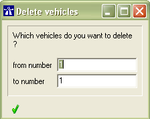 in which it is possible to determine which datasets shall be deleted. With
  the deletion will be confirmed.


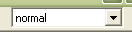 - with this menu different display options of the datasets can be selected. The display options are different from master data to master data and to dynamic data dialogues. The fields in the following filter are being changed according to the selected display option.

 - opens a filter
 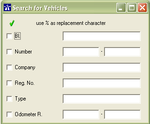 according to the selected display option. Use the % as placeholder. With the filter settings will be confirmed.


 - creates a hardcopy of the displayed, filtered and sorted datasets, which can be printed or saved as PDF-file. The formating of this report, e.x. column width, IS NOT possible. (see printing).

 - export of the displayed, filtered and sorted datasets in a semicolon separated CSV-file. The formating of this exportfile, e.x. column order, IS NOT possible.

 - for details q.v. copy cards / copy vehicles / copy drivers

 - see counter
